

DNS
Name resolution, split DNS, search domains, and custom records for your mesh network
DNS gives every node in your mesh network a hostname, and lets you control how nodes resolve everything else — which upstream resolvers they use, which domains are routed to internal nameservers (split DNS), which search domains expand short names, and which custom records are answered directly inside the network.
Overview
With DNS enabled, you can reach nodes by name instead of overlay IP:
ping server-01.abc123.baseguard.link
ssh user@database.abc123.baseguard.link
curl http://api.abc123.baseguard.link:8080
Or just by node name — your organization domain is added as a search domain automatically:
ping server-01
ssh user@database
curl http://api:8080
Beyond node names, DNS lets you:
- Nameservers — replace the nodes' system resolvers with resolvers you choose, or route only specific domains (split DNS) to an internal nameserver
- Search Domains — let short names like
dbexpand todb.corp.example.com - Records — answer custom
A/AAAArecords (including wildcards) directly inside the network - Tags — scope any of the above to a subset of nodes using tags
How It Works
Each node runs its own lightweight DNS resolver inside the Baseguard daemon. It listens on a node-local address (the first address of your organization's overlay range, 100.64.0.1 by default) and is only reachable from the node itself — other nodes cannot query it.
When DNS is enabled, Baseguard configures the operating system to send queries to this resolver. For every query the resolver:
- Node names —
<node-name>.<organization-domain>is answered with the node's overlay IP. Reverse lookups (PTR) for overlay IPs return the node name. - Records — if the name matches a custom record (exact or wildcard), that record is returned.
- Split DNS — if the name falls under a nameserver's Match Domain, the query is forwarded only to that nameserver. The most specific match wins.
- Global nameservers — everything else is forwarded to nameservers without a match domain. If none are configured, the node's original system resolvers are used.
- System resolver fallback — if every global nameserver fails and Override local DNS is off, the node retries once using its own system resolvers.
The configuration is pushed to nodes in real time from the control plane. Changes made in the console take effect on connected nodes within seconds; no reconnect is needed.
Enabling DNS
DNS is controlled in two places: an organization-wide setting in the console, and a local setting on each node. A node uses Baseguard DNS only when both are on.
Organization Setting
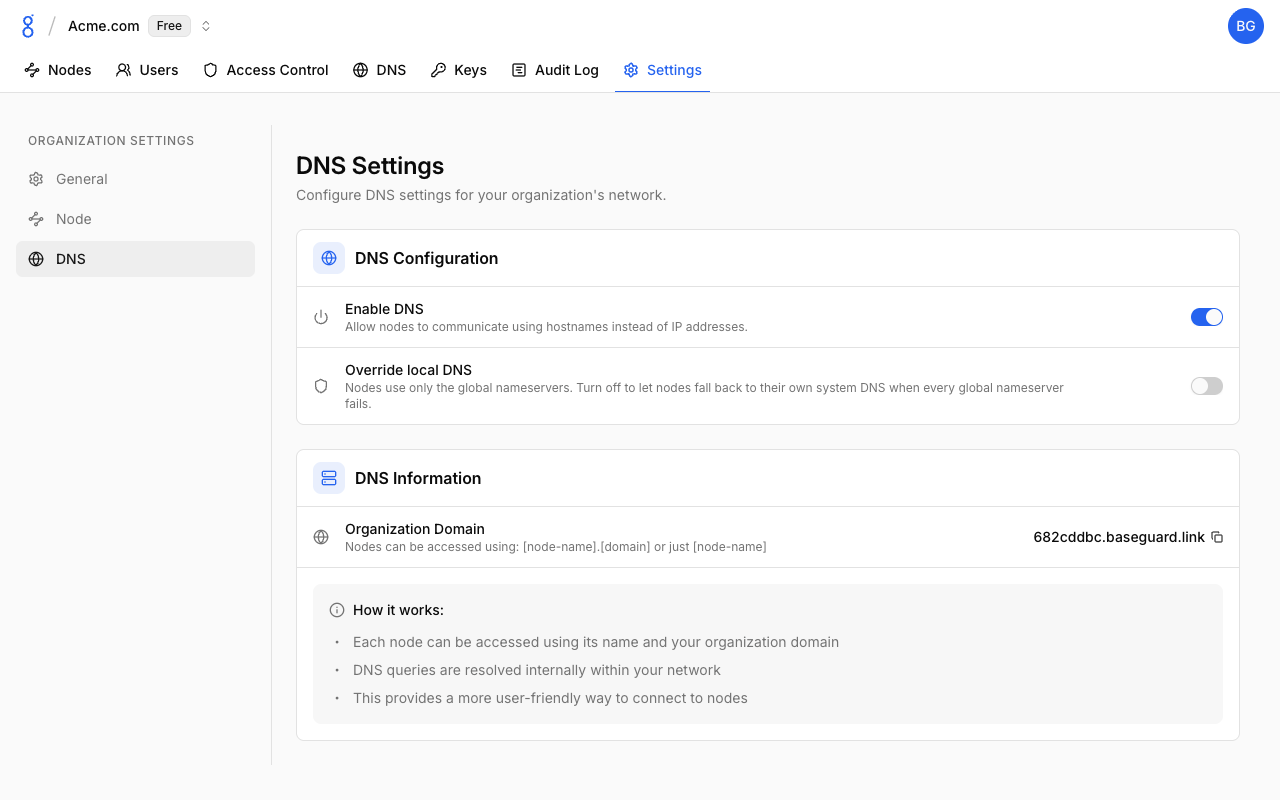
- Go to Settings > DNS
- Toggle Enable DNS on
- Your organization domain is shown under DNS Information (e.g.,
abc123.baseguard.link)
New organizations have DNS enabled by default. The DNS entry in the top navigation only appears while DNS is enabled.
| Setting | Default | Description |
|---|---|---|
| Enable DNS | On | Allow nodes to communicate using hostnames instead of IP addresses. When off, nodes leave their system DNS untouched. |
| Override local DNS | Off | Nodes use only the global nameservers. Turn off to let nodes fall back to their own system DNS when every global nameserver fails. |
Node Setting
Each node can opt out locally with the baseguard set command:
baseguard set --dns=false   # leave system DNS untouched on this node
baseguard set --dns=true    # default
Run baseguard set without flags to print the current value. The change is picked up by the running daemon within a few seconds — no reconnect is required.
Nameservers
DNS > Nameservers lists the upstream resolvers your nodes forward to.
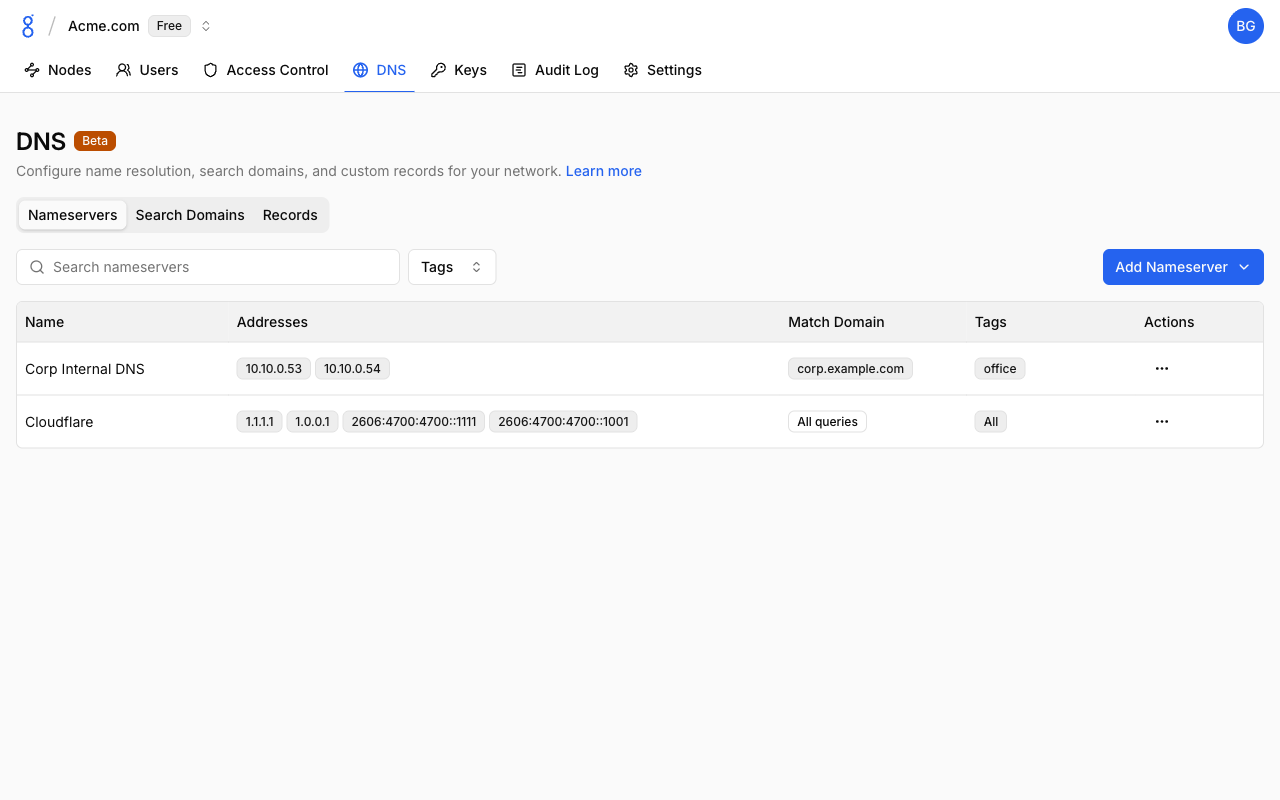
| Column | Description |
|---|---|
| Name | Display name |
| Addresses | IPv4/IPv6 addresses of the resolver (up to 8) |
| Match Domain | Domain suffix served by this nameserver, or All queries for a global resolver |
| Tags | Nodes this nameserver applies to, or All |
Global vs. Split DNS
A nameserver behaves in one of two ways depending on Match Domain:
- Match Domain off (global) — the nameserver replaces the nodes' system resolvers for all queries. Use this to enforce a specific public resolver (for example Cloudflare or Quad9) across your fleet.
- Match Domain on (split DNS) — the nameserver only receives queries for that domain suffix (e.g.,
corp.example.comand everything beneath it). All other queries are unaffected. Use this to resolve internal domains through a nameserver that is itself reachable over the mesh.
When several match domains apply to a query, the most specific (longest) suffix wins. Queries that match a split-DNS nameserver are never sent anywhere else — if that nameserver fails, the query fails.
Adding a Nameserver
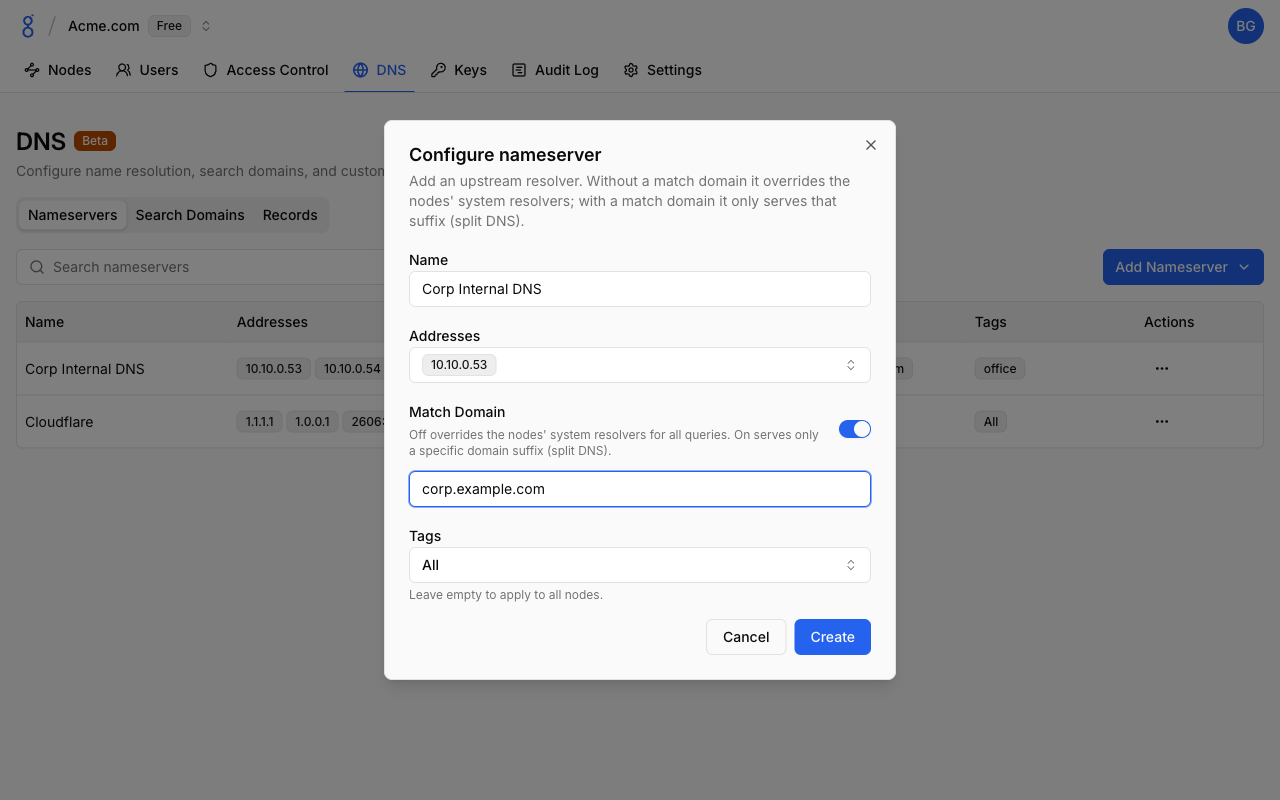
- Go to DNS > Nameservers
- Click Add Nameserver and choose a preset or Custom
- Fill in the form and click Create
| Field | Description |
|---|---|
| Name | Display name, up to 36 characters |
| Addresses | One to eight IPv4/IPv6 addresses. Plain DNS over port 53 only; hostnames, ports, DoT, and DoH are not supported |
| Match Domain | Off overrides the nodes' system resolvers for all queries. On serves only the given domain suffix (split DNS). The domain must be lowercase labels separated by dots; wildcards are not allowed |
| Tags | Leave empty to apply to all nodes, or select up to 16 tags to scope the nameserver to nodes carrying any of those tags |
The following presets are available from the Add Nameserver menu:
| Preset | Addresses |
|---|---|
| Google Public DNS | 8.8.8.8, 8.8.4.4, 2001:4860:4860::8888, 2001:4860:4860::8844 |
| Cloudflare | 1.1.1.1, 1.0.0.1, 2606:4700:4700::1111, 2606:4700:4700::1001 |
| Quad9 | 9.9.9.9, 149.112.112.112, 2620:fe::fe, 2620:fe::9 |
The same address cannot be used by two nameservers with the same match domain. All addresses of a nameserver are queried in parallel and the first successful answer is used.
Search Domains
DNS > Search Domains lists the suffixes nodes append to short names. With corp.example.com as a search domain, ssh db resolves db.corp.example.com.
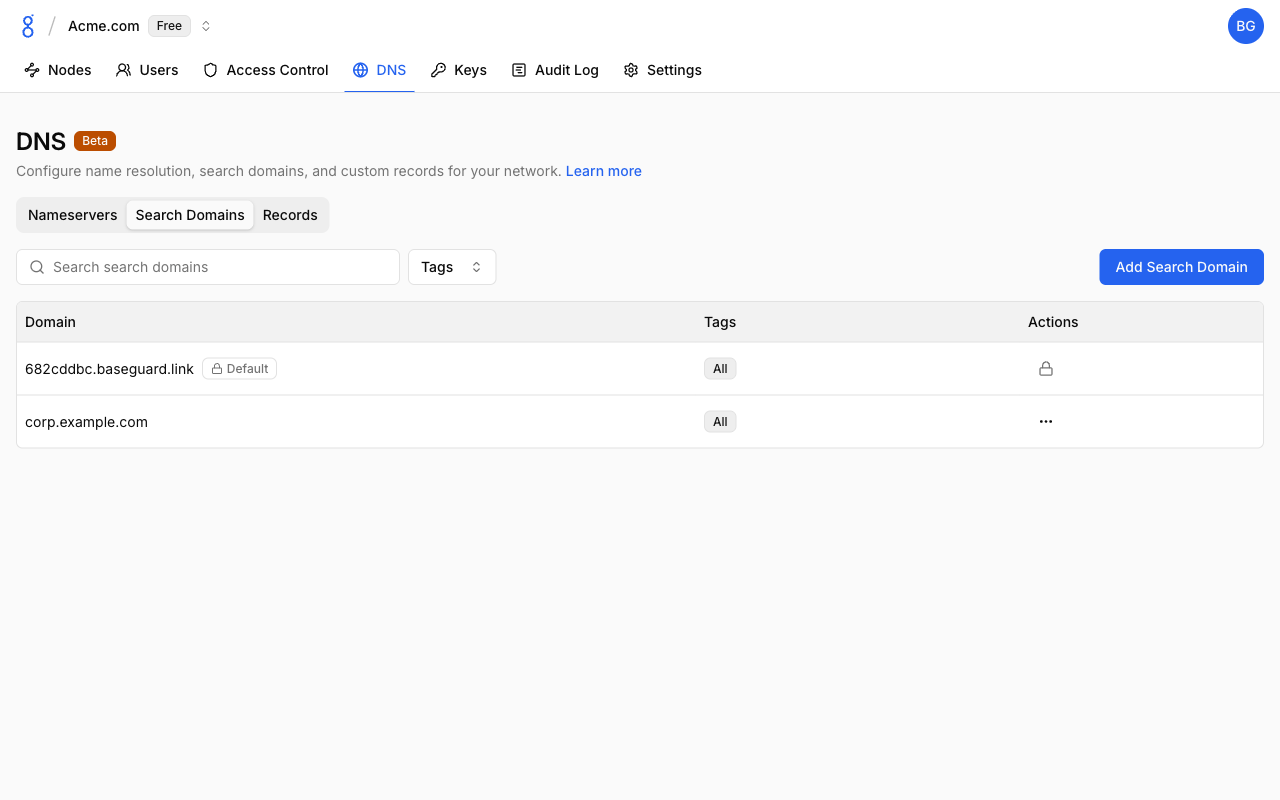
Your organization domain is always present as a read-only Default entry — it is what makes ping server-01 work without the full name. It cannot be edited or removed.
Adding a Search Domain
- Go to DNS > Search Domains
- Click Add Search Domain
- Enter the Domain (lowercase labels separated by dots, no wildcards)
- Optionally select Tags to scope it to specific nodes
- Click Create
Each domain can be added once per organization. Search domains are applied to the operating system's resolver configuration on each node, so they work for every application.
Records
DNS > Records lists custom records answered authoritatively by the node resolvers, without contacting any upstream.
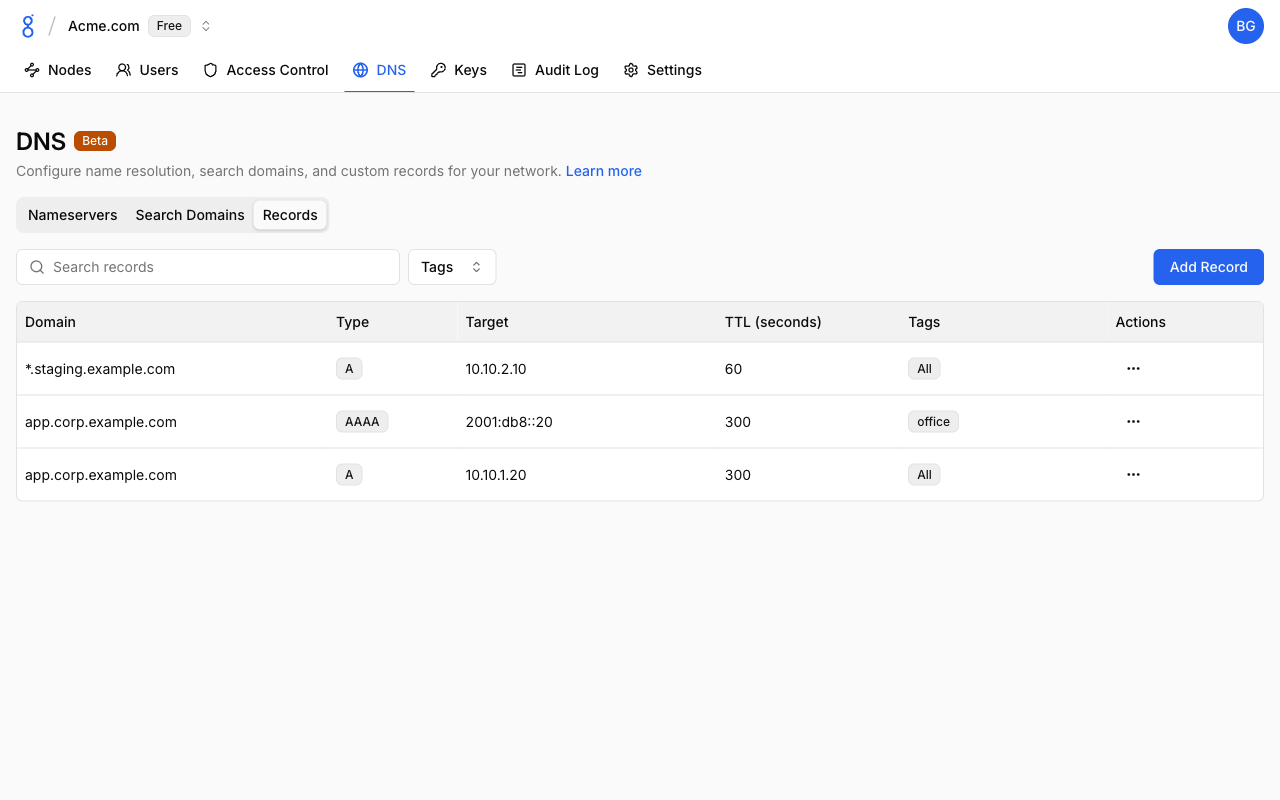
| Column | Description |
|---|---|
| Domain | Fully qualified name, optionally with *. |
| Type | A (IPv4) or AAAA (IPv6) |
| Target | IP address returned |
| TTL (seconds) | Seconds resolvers may cache the answer |
| Tags | Nodes the record is served to, or All |
Adding a Record
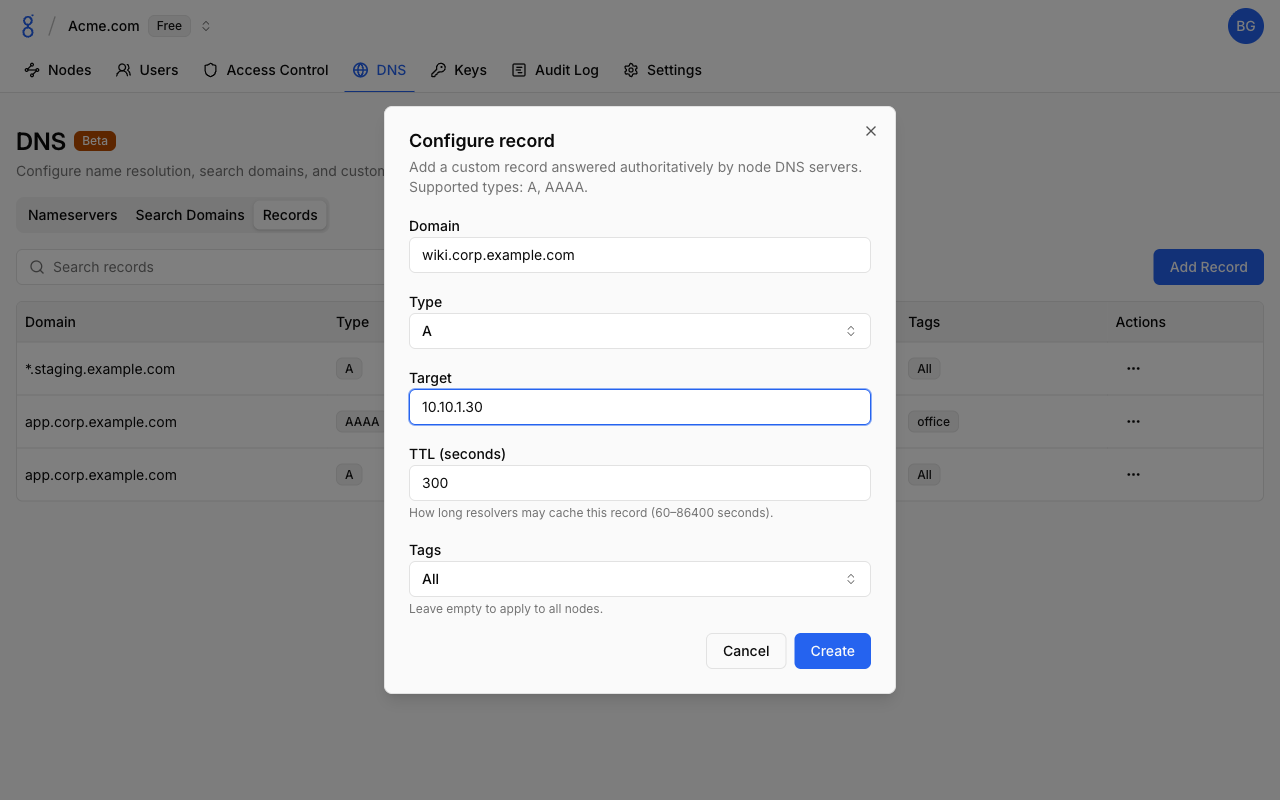
- Go to DNS > Records
- Click Add Record
- Fill in the form and click Create
| Field | Description |
|---|---|
| Domain | Name to answer, e.g. app.corp.example.com. A single leading wildcard is allowed, e.g. *.corp.example.com |
| Type | A or AAAA |
| Target | A valid IPv4 address for A, IPv6 address for AAAA |
| TTL (seconds) | How long resolvers may cache the record. 60–86400, default 300 |
| Tags | Leave empty to apply to all nodes, or select up to 16 tags |
Record Behavior
- Wildcards match exactly one label:
*.corp.example.comanswersdb.corp.example.combut notcorp.example.comora.b.corp.example.com. - Multiple records for the same name and type are rotated round-robin, which gives simple load distribution.
- A name that has records is considered authoritative: asking for a type that isn't defined (e.g.
AAAAwhen onlyAexists) returns an empty answer instead of falling through to upstream nameservers. - The same
domain+type+targetcombination can exist only once per organization.
Tag Scoping
Nameservers, search domains, and records all accept an optional list of tags:
- No tags — applies to every node in the organization (shown as All)
- One or more tags — applies only to nodes carrying at least one of those tags
This lets you, for example, route corp.example.com to an internal nameserver only on tag:office nodes, or serve a staging record only to tag:ci runners. A tag that is referenced by any DNS object cannot be deleted until the reference is removed; the tag's usage dialog links directly to the affected entries.
Use the Tags filter above each table to see which entries apply to a given tag.
DNS Names
Format
<node-name>.<organization-domain>Examples:
laptop.abc123.baseguard.linkprod-db-01.abc123.baseguard.link
Node names resolve to the node's overlay IPv4 address. Only nodes you are allowed to reach under your network rules are resolvable.
Node Names
The DNS label is the node name shown in the console. It is derived from the device hostname when the node joins; if the name is taken, a numeric suffix is appended (laptop-2). To change it:
- Go to Nodes
- Click on a node
- Edit the Name field
- Save
Valid Names
Node names must be valid DNS labels:
- Lowercase letters, numbers, hyphens
- Max 63 characters
- Cannot start or end with a hyphen, no consecutive hyphens
Reserved Domains
baseguard.link and baseguard.net (and any domain above or below them) are reserved and cannot be used for records or search domains.
Platform Notes
Baseguard changes the operating system resolver configuration only while connected with DNS enabled, and restores it on disconnect. A watchdog re-applies the configuration if another tool overwrites it.
| Platform | How DNS is applied |
|---|---|
| Linux | Uses systemd-resolved (per-link DNS on the tunnel interface) when available. Otherwise /etc/resolv.conf is replaced with a marked file and the original is backed up to /etc/resolv.conf.baseguard-backup. |
| macOS | Adds a supplemental resolver entry via the system configuration framework. The network preferences UI and /etc/resolv.conf are not touched. |
| Windows | Sets the tunnel adapter's DNS and adds a Name Resolution Policy Table (NRPT) rule so that queries are not leaked to other adapters. Requires Windows 10 build 19041 or later. If Group Policy NRPT rules exist, Windows may ignore the local rule. |
| Mobile | DNS server and search domains are applied through the VPN profile. |
Troubleshooting
See Troubleshooting — DNS Issues for solutions to DNS resolution and external DNS problems.
See Also
- Networking — How connections work
- Nodes — Node management
- Tags — Scoping DNS entries to nodes
- Organizations — Organization settings
baseguard set— Local DNS toggle- Public API — Manage DNS programmatically